|
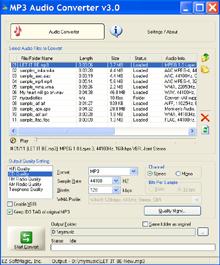 MP3 Audio Converter
is a very useful
audio converter to
convert
MPEG
files (*.mp3, *.mpa), Windows Media Audio files
(*.wma, *.asf), AAC files (*.aac), Apple Lossless
Audio files (*.m4a), MPEG-4 files
(*.mp4), Dolby Digital AC-3 files (*.ac3)
to
MP3, WAV, WMA, OGG,
APE, FLAC, MPC and
VOX files. It's
fast and easy to use. Testimonials
>> MP3 Audio Converter
is a very useful
audio converter to
convert
MPEG
files (*.mp3, *.mpa), Windows Media Audio files
(*.wma, *.asf), AAC files (*.aac), Apple Lossless
Audio files (*.m4a), MPEG-4 files
(*.mp4), Dolby Digital AC-3 files (*.ac3)
to
MP3, WAV, WMA, OGG,
APE, FLAC, MPC and
VOX files. It's
fast and easy to use. Testimonials
>>
MP3 Audio Converter
supports up to
27 popular audio formats
(like
MP3, MPA, WMA, WAV, OGG, AAC, M4A, MP4,
AC3, FLAC, APE, WavPack, TTA, etc.).
You can convert one format to another (like MP3 to
WAV, MP3 to WMA, WAV to MP3, WMA to MP3, M4A to MP3 etc.), or convert
MP3, WAV, WMA,
OGG,
FLAC, APE, MPC to same format but with different encoding parameters (like
sample rate, bitrate, etc.).
With "Batch and Folder Conversion",
you are able to
convert multiple audio files of different formats,
as well as entire folders in one single conversion
by just a simple click.
If you're looking for
an application to help you to convert audio files in
different formats, you won't be disappointed in MP3 Audio
Converter !
 Download FREE
trial - It is free and easy. Get started now to convert
MP3/WMA/WAV/OGG audio files by just a few simple
clicks.
Download FREE
trial - It is free and easy. Get started now to convert
MP3/WMA/WAV/OGG audio files by just a few simple
clicks.
 Features
-
System Requirements
-
Features
-
System Requirements
-
 Buy Now Buy Now
Getting Started Now
- Convert audio files
to MP3 WMA WAV OGG
FLAC APE MPC
with MP3 Audio
Converter
Go>>
Main Features of
MP3 Audio Converter
Fast and Easy to Use
With the simple and straightforward
interface, you can get started by few clicks even
without reading any help. With our advanced audio
converter engine, it is fast and produces high
quality conversions.
Convert up to 27
Audio Formats
Supported audio formats are:
MPEG format
(*.mp3/*.mp2/*.mp1, *.mpa), WAVE format (*.wav), Ogg
Vorbis format (*.ogg),
Windows
Media Audio format (*.wma, *.asf), Apple Lossless
format (*.m4a), AIFF format (*.aif,
*.aiff), FLAC format (*.flac),
Monkey's
Audio format (*.ape, *.mac), Musepack format (*.mpc,
*.mp+, *.mpp), AAC format (*.aac), MPEG-4 format
(*.m4a;*.mp4), Dolby Digital AC-3 format (*.ac3),
Dialogic ADPCM format (*.vox), WavPack format (*.wv),
True Audio format(*.tta), OptimFROG format(*.ofr), Speex format (*.spx),
ADX audio format(*adx), AIX audio format(*.aix)
- Convert MP3 to
WMA/WAV/FLAC
-
Convert WMA to
MP3/WAV/FLAC
-
Convert WAV to
MP3/WMA/FLAC
-
Convert Apple
Lossless M4A to
MP3/WMA/FLAC
-
Convert
MPEG-4
MP4, AAC
to MP3/WMA/WAV
-
Convert MPA, ASF,
OGG to MP3/WMA/WAV
- Convert AIFF,
FLAC, APE, MAC, MPC, MP+, MPP, WV, TTA, OFR, SPX,
ADX, AIX to
MP3/WMA/WAV
-
Convert
MP3,
MPA, WAV, OGG, WMA, ASF, M4A, MP4, AAC, AIFF,
FLAC, APE, MAC, MPC, MP+, MPP, WV, TTA, OFR, SPX,
ADX, AIX to OGG/VOX/APE/MPC
- Convert to WAV
with different audio codecs: PCM, ADPCM, U-Law,
A-Law
- Convert MP3, WAV, WMA, OGG,
FLAC, APE, MPC to
same format but with different encoding
parameters
To learn more about
audio format, please click
here.
Batch & Folder
Conversion
MP3 Audio Converter is able to convert multiple
audio files of different formats, as well as entire
folders in one single conversion by just a simple
click.
Conversion Quality Management
Pre-defined conversion qualities (like
HiFi Quality, CD Quality, FM Quality,
etc.) make it easy for you to set and
manage the encoding parameters. Even
more, you can edit or even create your
own conversion qualities.
Normalize Audio Data
MP3 Audio Converter is able to normalize
the audio data during conversion.
Normalization percent can accept values
from 0% to 100%. For example, choose 50%
to compute values needed to amplify the
audio data no more than 50% of maximum.
Built-in Audio Player
With
built-in audio player, you are able to
play the audio files without any 3rd
party player.
Support Drag & Drop
Simply
drag & drop audio files or even audio
folders to add into the conversion list.
System Requirements
Operating Systems
- Microsoft Windows 2000/XP/Vista/Windows
7/Windows 8
- Minimum
Hardware
- Pentium 233 MHz (Recommended:
Pentium 500MHz or greater)
- 64 MB RAM (Recommended: 128 MB
RAM or greater)
- 10 MB hard drive space
- Sound Card (optional)
|
|