Advanced Functions of MP3 Joiner
| |
|
|
Merge with Different Mode |
|
|
MP3 Joiner Pro provides two
merge
modes:
Direct/Fast
Mode -
Merge the audio files directly without re-encoding, it is fast
and keeps exactly the same sound quality of original audio
files.
Conversion Mode
- Convert all audio files to same encoding in advance before
merge. You can choose this mode to merge audio files of
different format or encoding parameters. Furthermore, you
are able to define the Sample Rate and Channel of the output
file.
MP3
Joiner Pro uses 'Auto. Detect'
mode by default, which will analysis the
audio file you just loaded and then
automatically select the best
merge
mode for you.
back to top |
|
|
|
|
Partial Merge |
|
 You
can merge either the entire file or any portions of audio files.
You can set only one portion of a file to
merge at one time. If you'd like to merge more portions of the
same file, please just add the file to the merge list again and
set its portion to merge. You
can merge either the entire file or any portions of audio files.
You can set only one portion of a file to
merge at one time. If you'd like to merge more portions of the
same file, please just add the file to the merge list again and
set its portion to merge.
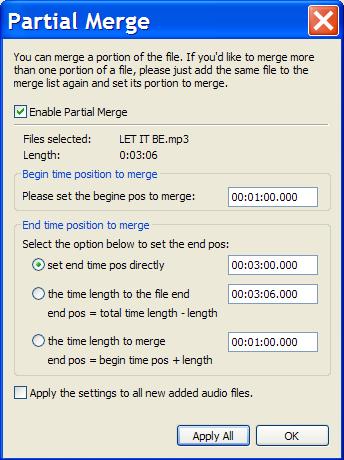
To set 'Partial Merge', just
select the files and click 'Partial Merge' button to open the
setting dialog.
Enable
Partial Merge -
enable or disable Partial Merge.
Begin Time
Position -
the time position for the merge to start at.
End
Time Position
- the time position for the merge to end at. There are three
ways to set the end position:
- set end pos directly
- set the time length to the file end. (end pos = total time
length - length)
- set the time length to merge. (end pos = begin time pos +
length)
Auto Apply Partial Merge
- check the option 'apply the setting to all new added audio
files' if you'd like to apply the Partial Merge automatically.
back to top |
|
|
|
|
Import/Export track information from M3U, PLS file |
|
MP3 Joiner Pro is
able to import and export track information directly from M3U
(*.m3u) and PLS (*.pls) file:
Import track information -
you can import the tracks to merge from either
M3U (*.m3u) or PLS (*.pls) file. Click
'Open List' button, select the file to import. Once done, the
tracks will be automatically added in the merge list.
Export track information -
you can export the tracks in the merge list to M3U (*.m3u) file.
Click 'Save List' button, export the tracks in the merge list to
the file you selected.
back to top |
|
|
|
|
Insert Silence between
Tracks |
|
|
Same as the standard
version. Click
here to view.
back to top |
|
|
|
|
Set ID3 Tag information
of Merged MP3 |
|
|
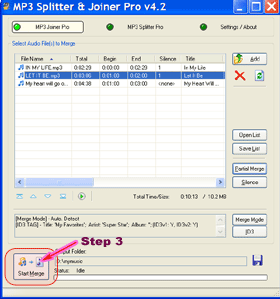
Click the 'ID3'->'Edit ...' button
right near the merge information box to set the ID3 tag
information for the MP3 file that will be merged if you want,
such as Title, Artist, etc.
Or click 'ID3'->'Copy' button, it allows you to copy the
ID3 tag information directly from any of the selected MP3 file
in join list.
back to top |
|
| |
|
|
|



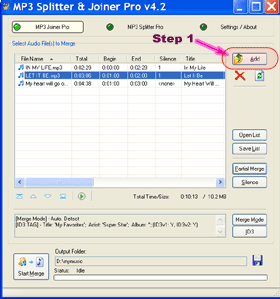
 ,
, ,
, ,
, .
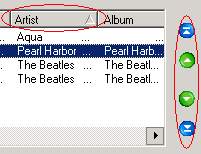
Also, just select & drag audio files in the list to the
new position you'd like to move. Or you can quickly sort the merge
list by each column, by simply clicking the corresponding column
header.
.
Also, just select & drag audio files in the list to the
new position you'd like to move. Or you can quickly sort the merge
list by each column, by simply clicking the corresponding column
header.